Metrics Explorer - See the Full Picture
The Opportunity: See More Than Just Clicks
Great test hypotheses are rarely as simple as "increase organic clicks." But to see the full picture can take a lot of work. This data lives in separate, siloed platforms. Manually pulling, filtering, and comparing data from GSC, Google Analytics 4, and GMC for a specific page template is complex, time-consuming, and frustrating. It's easy to miss a critical insight or design a test that only measures half the story.
What We've Built
We're launching Metrics Explorer, a powerful new tool for your experiment design phase.
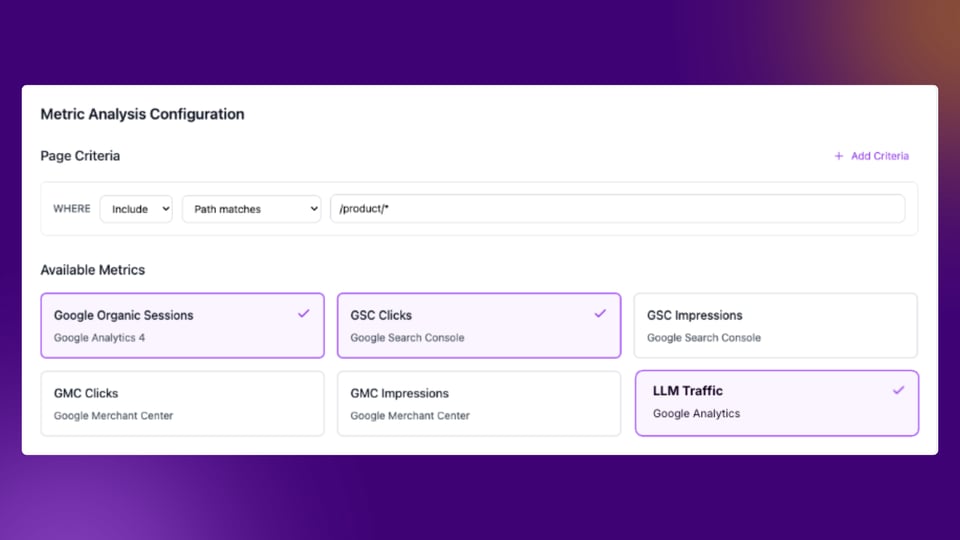
You can now pull all your key metrics into a single, unified view. Google Organic Sessions from GA4, GSC clicks, GSC impressions, GMC clicks, and even LLM traffic, all in one place.
You can instantly filter this data for any page template or testing section (like all pages where the path matches /product/*) and see how these different metrics relate to each other over time. No more jumping between tools. No more data confusion.
Multi-metrics bucketing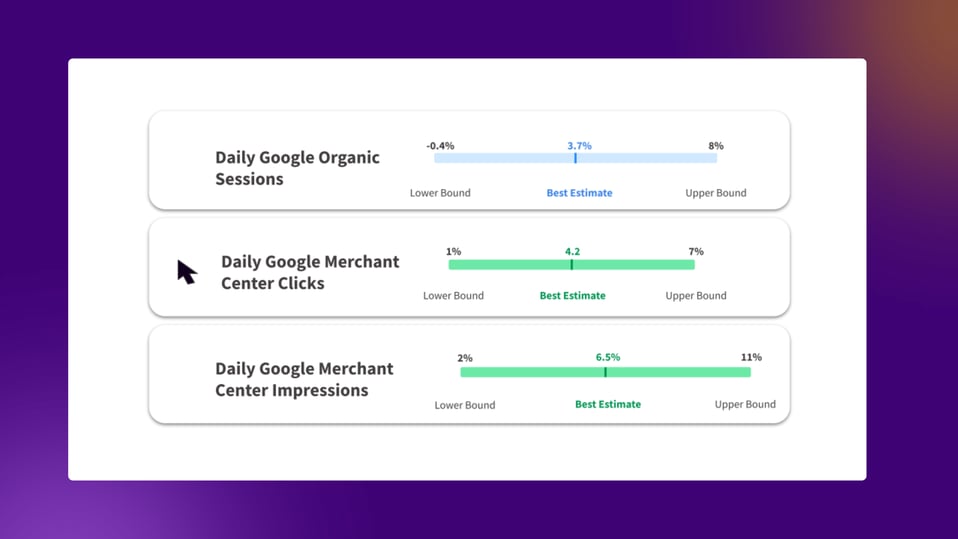
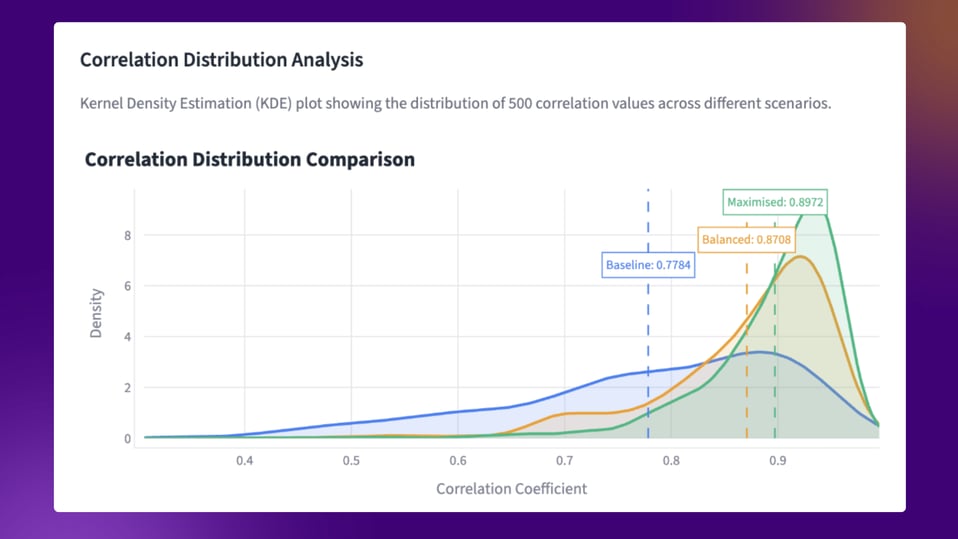
Not only do we make it possible to run tests that track multiple SEO metrics at once, but our latest R&D initiatives have also revealed a powerful new way to enhance test accuracy.
We've discovered that we can achieve more precise results by using multiple metrics for page bucketing. Instead of just grouping pages by a single attribute (like organic traffic), this method can create control and variant groups based on several metrics. This more sophisticated segmentation can improve the reliability of your SEO test outcomes.
Pre-Test Outlier Removal: Starting Your Tests on Solid Ground
The Problem: "Noisy" Data Can Ruin Your SEO Tests
In SEO testing, we test pages, not users. This small difference creates a huge challenge: outliers.
Outliers are pages with unusual traffic patterns that sneak into your historical data. Imagine a record-breaking heatwave suddenly spikes traffic to your "sun cream" pages. If this spike is in your lookback period, it contaminates your baseline data.
This "noise" creates uneven control and variant groups before your test even begins, making your results difficult or impossible to trust.
What We've Built
Our solution is an upgraded bucketing algorithm that stops outliers before they contaminate your test.
Instead of just finding outliers during a test, our system now analyzes your lookback window first. It automatically spots pages with abnormal traffic patterns and excludes them from the test groups.
By filtering out this "noise" at the source, we ensure your control and variant groups are as statistically similar as possible from day one. This delivers more robust, valid results and gives you the power to detect smaller uplifts with far greater confidence, knowing your data is based on a clean, fair comparison.
Strategic Template Splitting (Run More Tests, Faster)
The Opportunity: Unlocking Experimentation Velocity
Coming Soon!
For enterprise sites, your largest templates (like PDPs with millions of pages) hold the most traffic and the biggest opportunities for growth. But how do you leverage all that traffic for rapid learning?
Running a single test across the entire template is safe, but it consumes all your available traffic for that segment. This creates a queue for other great ideas and naturally caps your learning velocity.
The critical question has always been: "How can I safely multiply my testing power on this template? How many tests can I run? And how do I know the results from one group will even apply to the rest?
What We've Built
We're introducing Strategic Template Splitting.
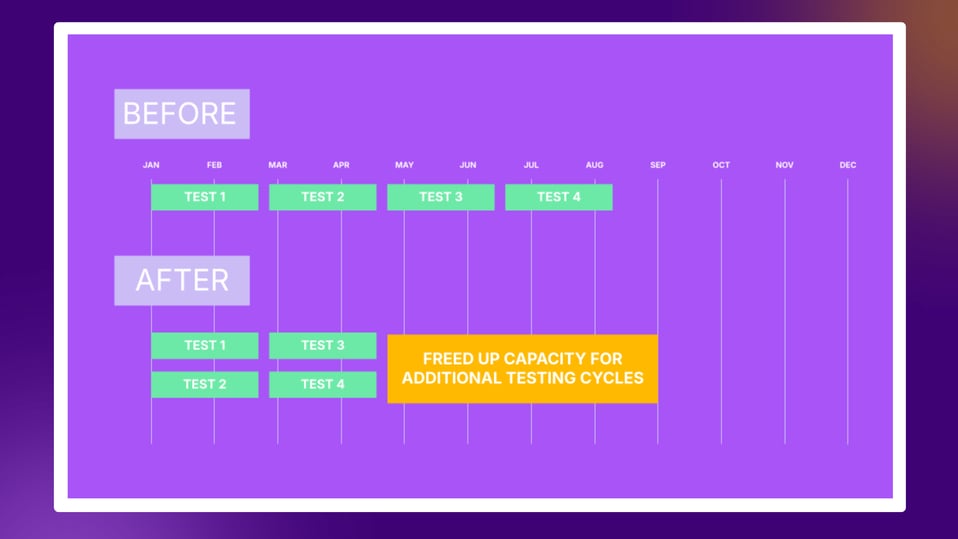
Our platform analyses your major templates and tells you exactly how many concurrent tests you can safely run. We handle the complex statistical analysis to identify truly representative subsets, empowering you to confidently create multiple valid test groups from a single large template.
The Benefit: Unlock Velocity and Confidence
This unlocks two massive wins:
- Multiply Your Test Velocity - Instead of running one test on your PDPs, you can now run three, four, or more experiments simultaneously. You learn faster, find more winners, and accelerate your entire program.
- Act on Results with Confidence - Because these groups are built to be statistically representative, you can extrapolate with total confidence. A winner in "PDP Group A" is far more likely to be a winner when you roll it out across all your PDPs.
It's a clear path to faster, more reliable growth.
Segmented Analysis - Go Beyond the "Average" Result
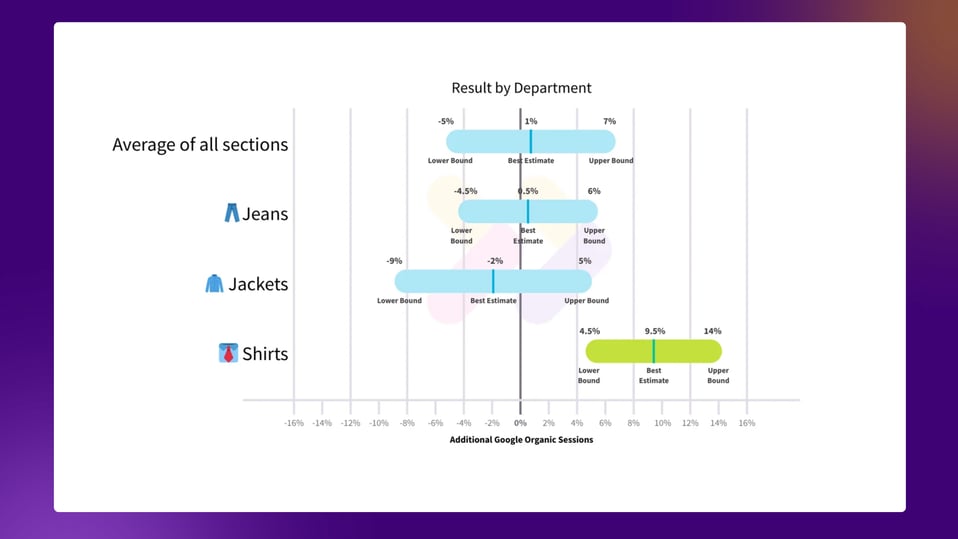
The Opportunity: Finding the Win Within the Average
Imagine you run a big test across all your product detail pages, and the result comes back inconclusive.
Here's what's actually happening: that single "average" result is hiding the real story. Your change might be crushing it with a +10% win in "Shirts" while making no noticeable difference in other departments. But until now, you wouldn't have known.
What We've Built
We're introducing Segmented Analysis, a new tool for digging deeper into your results.
After your experiment wraps up, you can now slice your data to see how your change actually performed on specific, pre-defined subsets of pages.
One important note: This feature is built for insight gathering, ideation, and iteration. Not for making final rollout decisions. Use it to generate smarter hypotheses for your next test, not to turn a flat result into a false winner.
The Benefit
Segmented Analysis transforms how you learn from your tests.
Instead of just getting a pass/fail grade, you get actionable intelligence. That "flat" test becomes a goldmine of learning, revealing that your next move should be "iterate this change, but only for Jeans."
This means smarter ideation, fewer abandoned ideas that were actually hidden gems, and a much faster path to discovering what really moves the needle for your most important pages.
Range of Outcomes (See the "True" Result at a Glance)
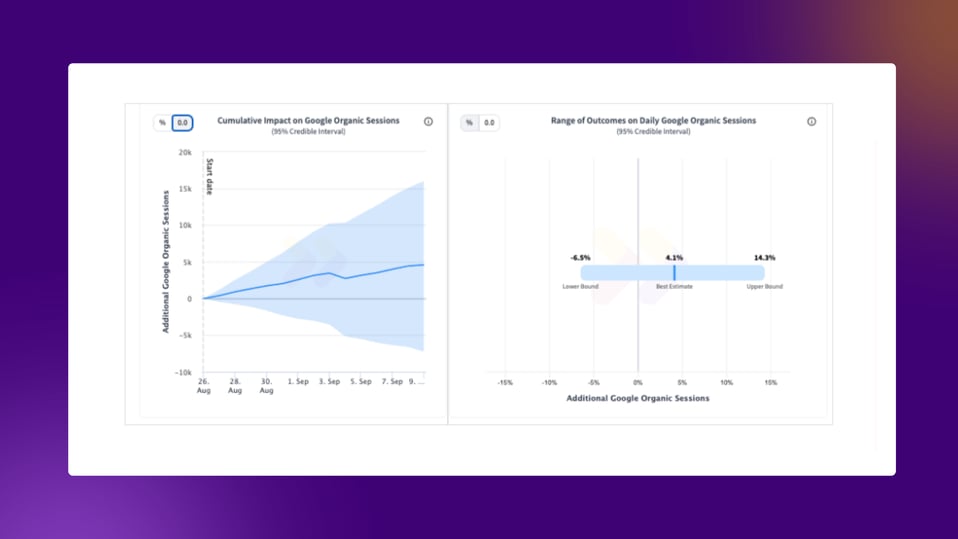
The Opportunity: Separating the Signal from the Noise
Every team wants to make confident, data-driven decisions as quickly as possible. But the way we watch tests unfold can sometimes get in the way.
The cumulative time-series chart is powerful, but it presents a natural challenge: our brains are wired to see patterns. As a line trends up, it's incredibly tempting to feel a trend, even when the wide, shaded "credible interval" still crosses zero. This confirmation bias can make us want to see a winner, leading to second-guessing or misinterpreting an inconclusive result.
The critical opportunity is to get a clear, unbiased answer. How can we look past the emotional day-to-day journey and see only the final, statistical truth?
What We've Built: The Range of Outcomes View
We're introducing the new Range of Outcomes view. This chart is built for clarity. It removes the day-by-day "journey" and instead gives you the final, unbiased summary of the test's performance.
It clearly visualises the three most important data points:
- Best Estimate: The most likely impact of your change.
- Lower Bound: The lower end of the 95% credible interval.
- Upper Bound: The upper end of the 95% credible interval.
There's no trending line to misinterpret. Just the final statistical truth of your experiment.
The Benefit: Confident Decisions in Seconds
The power of this view is its unbiased clarity. It strips away the emotion and cognitive bias of the time-series graph, allowing you to make a confident, data-driven decision in seconds.
It makes the most important question simple to answer: Is the entire blue bar (the 95% credible interval) above zero?
- If yes: You have a clear, statistically-valid winner.
- If it crosses zero: The result is inconclusive.
This view helps you stop second-guessing, make the right call, and build trust in your results, faster.
Advanced Analysis (Trust Your Results with Full Transparency)
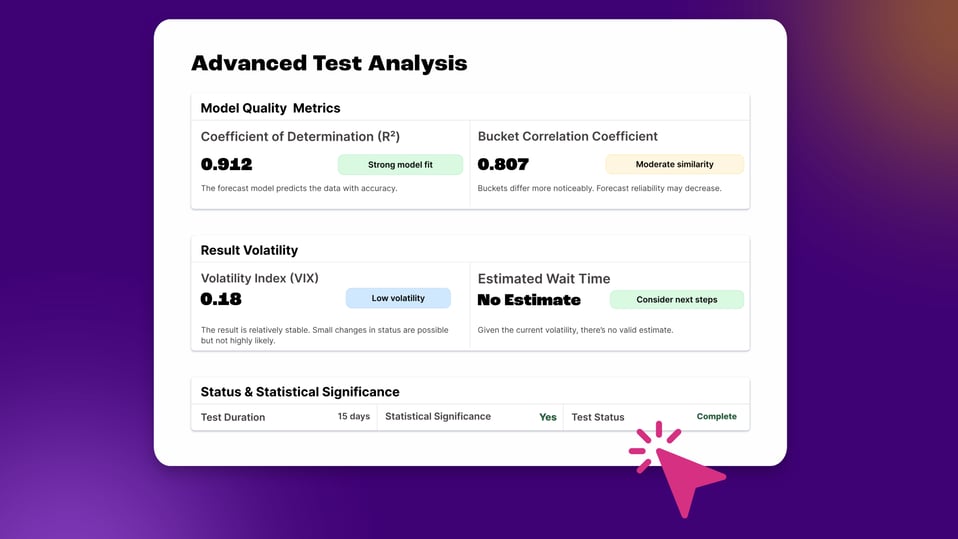
The Opportunity: Building Trust Through Complete Transparency
You're running a critical test, and the result is "inconclusive" or taking a long time. You're left with pressing questions that are impossible to answer:
- "Is this a 'good' test? How well were my buckets correlated in the first place?"
- "How stable is this result? Is it 'low volatility' and just needs more time, or is it 'high volatility' and will never settle down?"
- "How do I know the forecast model is a strong fit for my data?"
Without this data, you're forced to just "trust the system." This is especially frustrating when you need to explain a test's status to a sceptical stakeholder or your data science team.
What We've Built
We're pulling back the curtain and giving you direct access to the same deep, quantitative metrics our own data scientists use to validate a test.
In the new Advanced Analysis panel, you get full transparency into the "under the hood" quality of your experiment, including:
- Model Quality Metrics: See the Coefficient of Determination (R²) to know precisely how well our forecast model fits your data.
- Bucket Correlation Coefficient: Get a hard number that proves how statistically similar your control and variant buckets were.
- Result Volatility (VIX): A quantitative score for result stability, so you can see the difference between a stable-but-inconclusive test and one that's wildly unstable.
- Estimated Wait Time: A clearer, data-driven estimate (when available) on how much longer your test needs to run.
The Benefit: From "Trust Me" to "Trust the Data"
This feature moves your testing program from a world of "belief" to a world of "proof."
When you present a result, you are no longer just showing a chart; you are showing the evidence behind it. You can confidently state, "This is a high-confidence winner, and we know this because the R² was 0.91 (a strong model fit) and the volatility was low."
This complete transparency gives you the power and authority to defend your results, make smarter decisions on when to stop a test, and build unshakeable trust in your testing program.
Experiment Tagging (Unlock Your Program's Meta-Analysis)
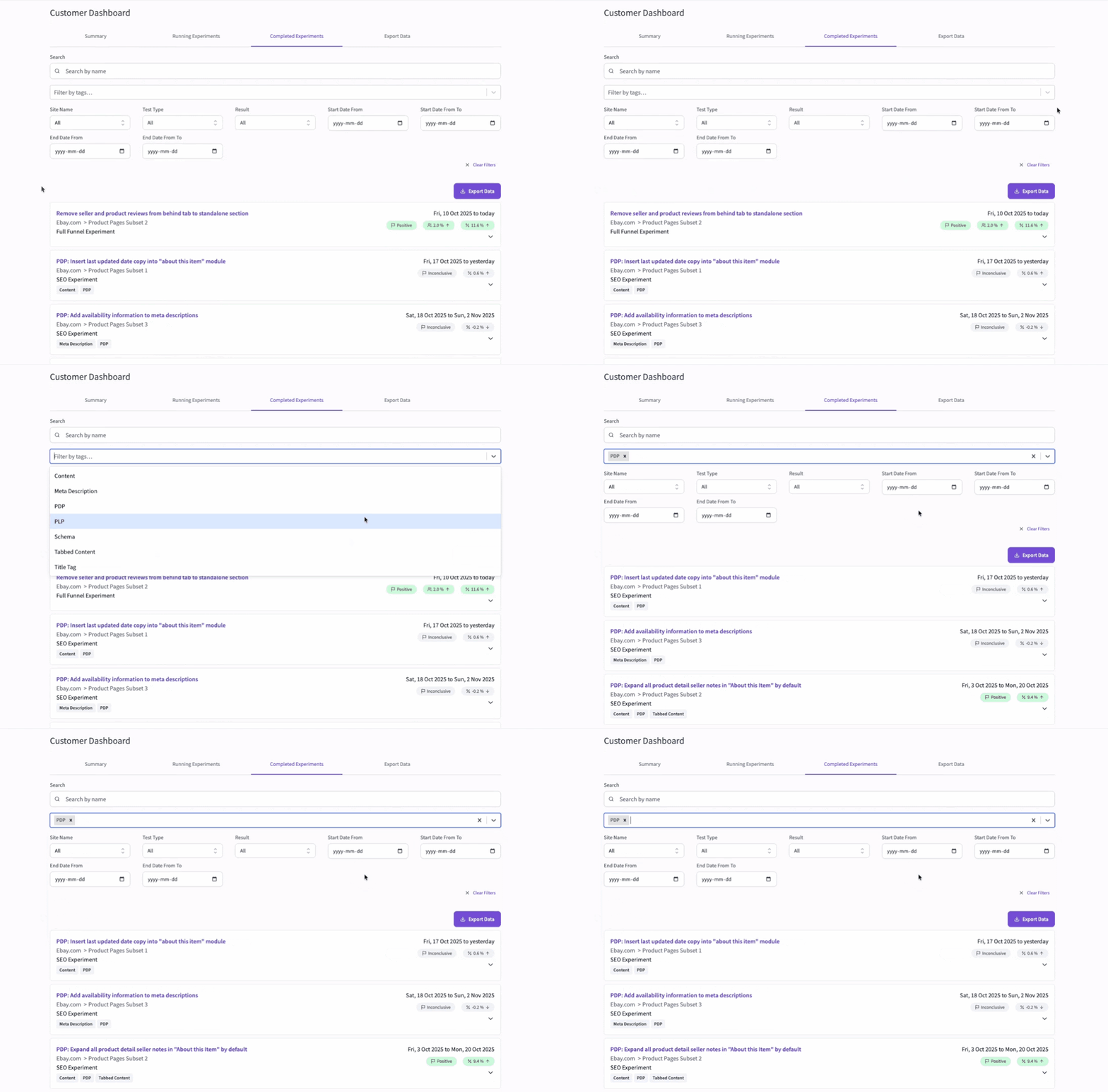
The Opportunity
Your testing program is a goldmine of data, but it's often trapped. After 20, 50, or 100+ experiments, your 'Completed' list becomes a long, unsearchable archive.
Answering high-level strategic questions is nearly impossible:
- "What's our average win rate for all 'Content' tests?"
- "Show me every 'Structured Data' experiment we ran last year."
- "Are our new 'AI' test ideas actually leading to positive outcomes?"
This makes it incredibly difficult to spot trends, benchmark your efforts, or know if your test prioritisation process is actually effective.
What We've Built
We're introducing Experiment Tagging. Now, you can add one or more descriptive tags to every experiment you run. For example, 'Content', 'AI', 'PDP', 'Internal Linking', or 'Titles'. You can make any custom tag you like.
This instantly organises your entire program. You can filter your 'Running' or 'Completed Experiments' lists by one or more tags to find exactly what you're looking for in seconds.
The Benefit
This is about more than organisation; it's a powerful meta-analysis.
The new Detailed Tag Usage report aggregates performance for every tag, giving you a quantitative view of your testing strategy. You can finally answer: "What kinds of tests have the biggest impact?" This data is crucial for validating your test prioritisation, giving you the proof to rethink your strategy when a high-priority tag shows a low win rate.
Experiments API
The Opportunity: Integrating SEO Wins with the Entire Business
Your SEO testing program is generating powerful insights and driving real growth. The next step is to connect that value to the rest of your company's analytics ecosystem.
When your SEO data lives in its own platform, it creates a natural ceiling for your team's influence and efficiency. The key opportunity is to break down these silos to:
- Scale Your Reporting: Move beyond manual copy-paste work by creating a way to automate performance tracking for your entire testing program.
- Elevate SEO's Visibility: Your results deserve to be in the central company dashboards. When CRO and Product teams present their wins in the company-wide Experimentation Center of Excellence, SEO should be right there with them, proving its value.
- Unlock Deeper Analysis: Empower your data science team to easily combine SEO test results with other internal business data (like LTV or margin) for richer, custom strategic analysis.
What We've Built: Your Data, Your Way
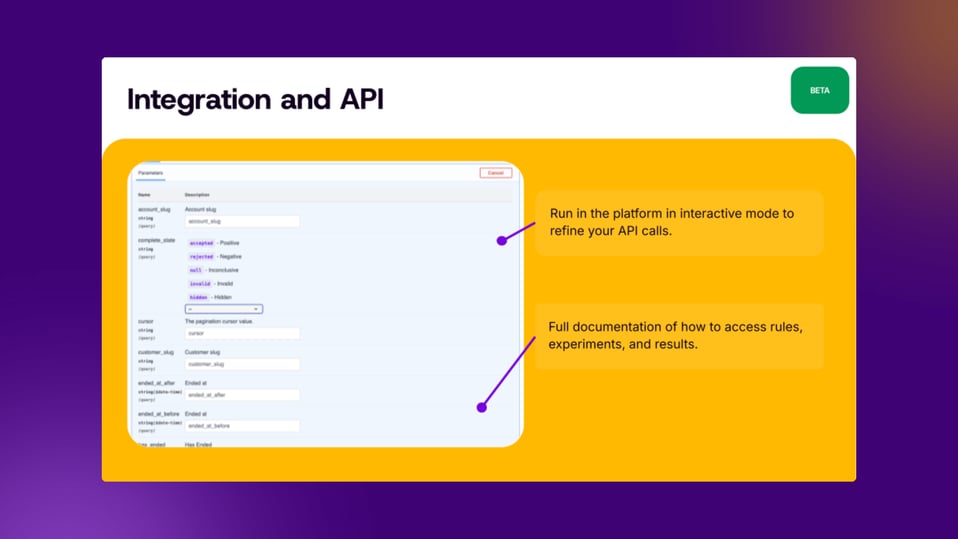
We're launching the SearchPilot Experiments API to help you seize this opportunity. This gives you programmatic access to your entire testing program, so you can pipe your data wherever you need it.
The API has two key parts:
- Program-level endpoints: Automatically retrieve lists of all your running and completed experiments, including their titles, dates, hypotheses, tags, status, and summary metrics.
- Experiment-level endpoints: Pull detailed, granular data for any individual test, including the full list of bucket URLs, test duration, and all result summary stats (uplift %, significance, R², etc.).
The Benefit
This isn't just about data access. It's about changing SEO's role in your organisation.
- Automate all reporting. Pull program-level data into BI tools like Looker, Tableau, or Power BI to create live, automated dashboards that track your program's overall performance.
- Integrate with your ecosystem. Pipe SEO test results directly into your internal Experimentation Center of Excellence platforms. For the first time, you can place your SEO wins right next to CRO and Product wins in a single, unified company dashboard.
- Gain visibility and build trust. By bringing SEO into the main experimentation ecosystem, you give it the same organisational visibility and influence as other testing programs. This helps you prove your value and secure the resources you need to grow.
- Unlock deep analysis. Give your data science team the raw data they need to perform custom, deep-dive analyses that are specific to your business.