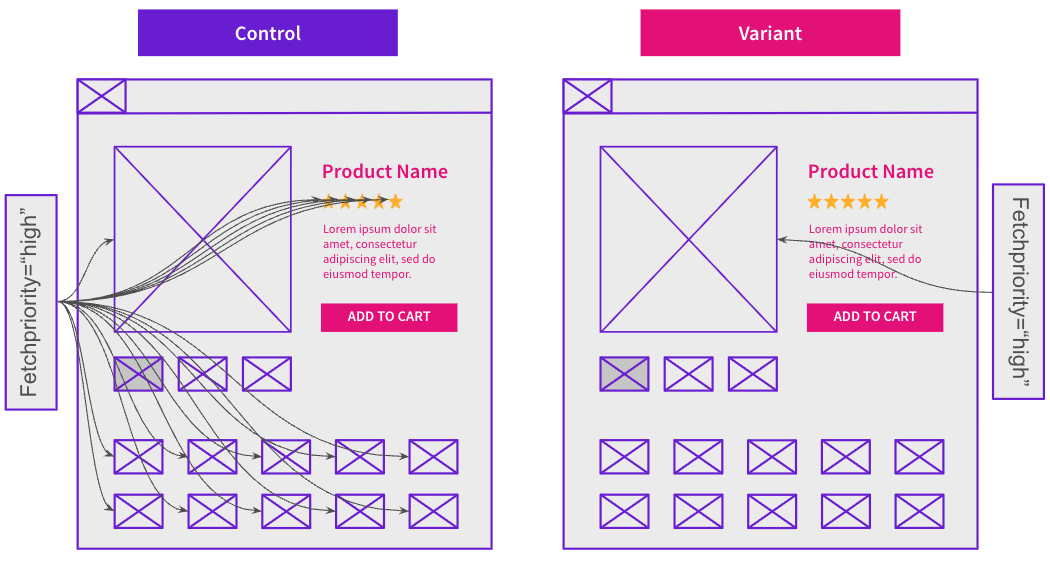
For this week’s case study, we’re looking at a test run by one of our ecommerce customers across their Product Detail Pages (PDPs). These pages contained numerous elements tagged with the fetchpriority="high" attribute, which instructs the browser to prioritize and load those resources first. The hypothesis was that overusing this attribute deprioritized the loading of the main product image and slowed the LCP load time, which was negatively impacting user experience.
To address this, the test removed fetchpriority="high" from all elements except the primary product image. The goal was to improve page load performance by ensuring that the browser focused its resources on rendering only the most critical content, in this case the main product image, first.
The Case Study
The fetchpriority="high" attribute is used to signal that a distinctive resource, most commonly an image, is especially important and should be fetched earlier than others. Rather than changing what content is loaded, it influences when that content is requested during the page load process.
When implemented correctly, it helps critical above-the-fold elements, such as the hero image, render earlier during page load which improves performance metrics including page load speed and Largest Contentful Paint (LCP), a key component of Google’s Core Web Vitals. Over time, improvements in these metrics can better enhance the user experience and support SEO growth by making pages faster, especially as Google's algorithm considers user experience and site performance when evaluating pages.
What Was Changed
The customer tested removing the fetchpriority="high" attribute from non-critical elements on their PDPs, keeping it only on the main product image, which typically serves as the LCP element. This adjustment was hypothesized to better align how the browser allocates its resources with what truly matters most for user experience and performance metrics. The change ensured that secondary images did not compete with the primary product image during the initial page load.
Results
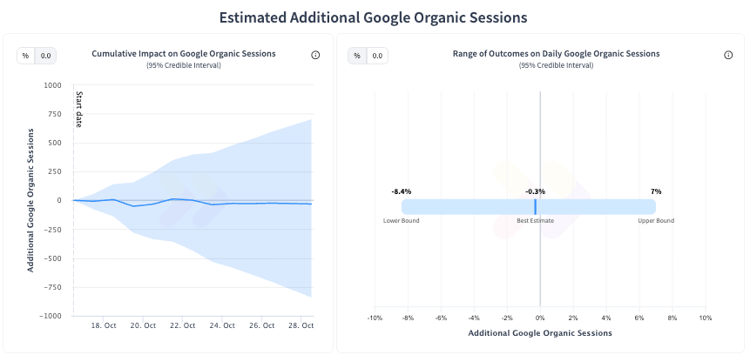
The test produced an inconclusive result, which was somewhat unexpected given that the control pages contained over 45 elements tagged with the fetchpriority=”high” attribute.
Despite the lack of a statistically significant positive result, the change was still considered a strong candidate for default to deploy, given that from both an SEO and performance perspective this change was a best practice. Importantly, this experiment showed no negative impact, indicating that reducing the amount of unnecessary prioritization did not harm performance metrics either. So a non-negative result with a strong hypothesis at its core gives us the confidence to say that deploying the change would be a long-term optimization for better page efficiency.
To receive more insights from our testing, sign up for our case study mailing list, and please feel free to get in touch if you want to learn more about this test or our split testing platform more generally.